Preparing for GITEX Global is very different from preparing for a normal business exhibition.
Your booth may look impressive, but if the laptop freezes during a product demo, the presentation screen does not receive a signal, the Wi-Fi connection fails, or your microphone stops working during a presentation, visitors will remember the technical problem rather than your product.
That is why having a detailed IT & AV Equipment Checklist for GITEX Global should be part of your exhibition planning from the beginning.
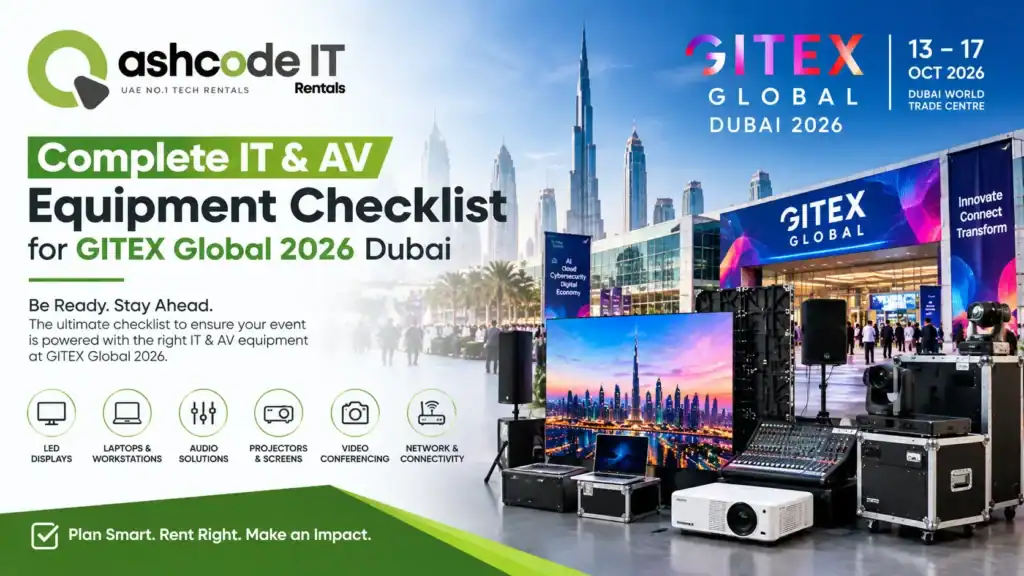
GITEX GLOBAL 2026 is scheduled for 7–11 December 2026. The official event information shows that the GITEX Scale Summit takes place on December 7 at Dubai World Trade Centre, while the main GITEX GLOBAL Expo runs from December 8–11 at Expo City Dubai. The 2026 edition marks the event’s move to Expo City Dubai.
For exhibitors, this venue change makes early technical planning particularly important. Your IT & AV Equipment Checklist for GITEX Global should cover everything from laptops and displays to networking, power, audio, presentation equipment, backup devices and technical support.
So, what equipment do you actually need?
Let’s go through the checklist step by step.
What Should Be Included in an IT & AV Equipment Checklist for GITEX Global?
A good IT & AV Equipment Checklist for GITEX Global should not be limited to the equipment visitors can see.
Your checklist should cover three layers:
IT equipment – laptops, tablets, desktops, networking equipment, storage and accessories.
AV equipment – displays, LED screens, projectors, microphones, speakers, cameras and presentation systems.
Operational equipment – chargers, adapters, cables, backup devices, power requirements, connectivity and technical support.
This approach makes your IT & AV Equipment Checklist for GITEX Global much more useful because it considers what your team needs before, during and after the exhibition.
1. Laptops and Computers
The first item on almost every IT & AV Equipment Checklist for GITEX Global should be laptops and computers.
Your team may need laptops for:
- Product demonstrations
- Software demonstrations
- Sales presentations
- Customer registration
- Lead capture
- CRM access
- Video playback
- Social media
- Business communication
- Online meetings
- Internal reporting
Do not assume that one laptop can handle every task.
A product demonstration may require a high-performance laptop, while a registration desk may only need a standard business laptop.
For software companies, AI companies, cybersecurity businesses and technology startups, laptops are often central to the booth experience.
If you are taking company laptops to GITEX, make sure every device is updated and tested before the event.
If you do not want to transport your own equipment, laptop rental Dubai services can provide temporary laptops for exhibitions and events.
This is particularly useful when you need several identical laptops for multiple demo stations.
Your IT & AV Equipment Checklist for GITEX Global should record the laptop model, user, software installed, charger, accessories and backup device for every workstation.
2. Tablets for Lead Capture and Demonstrations
The second item in your IT & AV Equipment Checklist for GITEX Global should be tablets.
Tablets can be useful at reception desks and demonstration counters because they are portable and easy for visitors to interact with.
Common uses include:
- Visitor registration
- Lead capture
- Product catalogues
- Surveys
- Interactive presentations
- Product demonstrations
- Appointment booking
- Digital brochures
- Customer feedback
If your sales team normally collects leads using paper forms, consider moving the process to tablets.
A digital lead capture process can make it easier to organise visitor information and follow up after GITEX.
Your IT & AV Equipment Checklist for GITEX Global should include tablets, charging cables, stands, security locks and the required applications.
Also check whether your lead capture application works offline if the internet connection temporarily becomes unavailable.
3. LED Screens and Large Displays
A large display is one of the most visible elements of a technology exhibition booth.
Your IT & AV Equipment Checklist for GITEX Global should therefore include the required display technology.
Depending on the booth design, you may need:
- Commercial displays
- Large-format screens
- LED video walls
- Interactive displays
- Digital signage
- Touchscreens
- Confidence monitors
A large display can be used to showcase product demonstrations, company videos, dashboards, customer testimonials and presentations.
For larger booths, an LED wall can become the visual centre of the stand.
If purchasing a large LED wall is not practical for a short event, GITEX equipment rental Dubai providers can offer temporary display solutions.
When adding displays to your IT & AV Equipment Checklist for GITEX Global, do not record only the screen size.
Also record:
- Resolution
- HDMI/DisplayPort requirements
- Mounting method
- Screen orientation
- Brightness
- Content format
- Video processor requirements
- Power requirements
This prevents last-minute compatibility problems.
4. LED Video Wall and AV Display Equipment
A professional IT & AV Equipment Checklist for GITEX Global should go beyond a basic TV or monitor.
Large technology booths may require an LED video wall or multiple displays.
An LED video wall can be used for:
- Brand visuals
- Product launches
- Live demonstrations
- Corporate videos
- Speaker presentations
- Customer testimonials
- Social media content
- Live dashboards
If your booth uses multiple displays, think about how content will be controlled.
Do you need one laptop feeding every screen?
Will each display show different content?
Will a video processor be required?
Will you switch between presentations and live demonstrations?
These questions should be answered before arriving at the venue.
Your IT & AV Equipment Checklist for GITEX Global should include the video processor, switcher, HDMI cables, adapters and backup signal equipment.
5. Projectors and Presentation Screens
Not every GITEX booth needs an LED wall.
For meeting rooms, presentations or enclosed conference areas, a projector may still be useful.
Your IT & AV Equipment Checklist for GITEX Global should consider:
- Projector
- Projection screen
- HDMI cable
- Wireless presentation system
- Remote control
- Presentation laptop
- Spare adapter
- Extension cable
- Backup presentation
Projectors can be useful when the audience needs to see detailed presentations in a meeting or training environment.
However, ambient lighting can affect projection quality, so evaluate the room before selecting a projector.
If the space is bright and highly exposed, a large commercial display may be more practical.
6. Microphones and Audio Equipment
A common mistake is focusing heavily on screens while forgetting sound.
Your IT & AV Equipment Checklist for GITEX Global should include audio equipment whenever your booth involves presentations, interviews, product demonstrations or speaking sessions.
Depending on the setup, you may need:
- Wireless microphones
- Lavalier microphones
- Handheld microphones
- Speakers
- Audio mixer
- Amplifier
- Audio cables
- Headphones
- Audio adapters
For a small meeting room, a compact speaker system may be enough.
For a larger presentation area, you may require a professional PA system.
Dubai World Trade Centre’s exhibition services also list audio solutions including PA systems and cordless microphones among its AV offerings.
Because GITEX 2026 moves to Expo City Dubai for the main expo, exhibitors should confirm venue-specific AV requirements and services through their exhibitor documentation rather than assuming previous GITEX arrangements automatically apply.
7. Cameras and Live Streaming Equipment
Another important addition to your IT & AV Equipment Checklist for GITEX Global is camera equipment.
If your marketing team plans to produce content during the event, consider:
- DSLR or mirrorless camera
- Webcam
- Tripod
- Gimbal
- Wireless microphone
- Lighting
- Capture card
- External storage
- Laptop
- Streaming software
Your team could record:
- Product demonstrations
- Customer interviews
- Founder interviews
- Expert discussions
- Booth tours
- Event highlights
- Social media content
If you plan to livestream, your IT & AV Equipment Checklist for GITEX Global should also include a dedicated internet connection, backup connectivity and a tested streaming workflow.
Do not wait until the first day of GITEX to discover that your camera and laptop are not compatible.
8. Internet and Networking Equipment
Reliable connectivity deserves its own section in every IT & AV Equipment Checklist for GITEX Global.
Modern exhibition booths depend heavily on internet access.
You may need connectivity for:
- Product demonstrations
- Cloud applications
- CRM
- Lead capture
- Payment systems
- Live dashboards
- Video streaming
- Online meetings
- Software authentication
- Social media
Venue-provided connectivity can vary by service and location.
For example, Dubai World Trade Centre provides public Wi-Fi and also offers dedicated high-speed internet and wired connectivity options for exhibitors.
For GITEX 2026, confirm the applicable Expo City Dubai connectivity options through the event and venue documentation.
Your IT & AV Equipment Checklist for GITEX Global should include:
- Primary internet
- Backup internet
- Wi-Fi router
- Network switch
- Ethernet cables
- Network adapters
- Access credentials
- Backup hotspot
- VPN requirements
If your demonstration depends on a cloud platform, also ask:
What happens if the internet stops working?
Prepare an offline demo or locally stored video as a backup.
9. Power and Charging Equipment
Power problems can quickly become exhibition problems.
Your IT & AV Equipment Checklist for GITEX Global should therefore include power planning from the beginning.
List the power requirements for:
- Laptops
- Displays
- LED walls
- Tablets
- Routers
- Chargers
- Audio systems
- Cameras
- Lighting
- Demo equipment
Do not simply count the number of devices.
Calculate the overall power requirement.
Venue utility planning can include different power socket and distribution options. DWTC, for example, lists 15- and 30-amp sockets as well as single- and three-phase distribution boards for exhibition requirements.
For the 2026 move to Expo City Dubai, check the official venue/exhibitor documentation for the applicable power specifications.
Your IT & AV Equipment Checklist for GITEX Global should include:
- Required sockets
- Power distribution
- Extension cables
- Surge protection
- Chargers
- Cable covers
- Backup power where appropriate
Power should never be an afterthought.
10. Adapters, Cables and Connectivity Accessories
This is one of the easiest categories to forget.
Your IT & AV Equipment Checklist for GITEX Global should include a dedicated cable and adapter box.
Consider carrying:
- HDMI cables
- DisplayPort cables
- USB-C cables
- USB-A cables
- Ethernet cables
- USB-C hubs
- HDMI adapters
- DisplayPort adapters
- Power extensions
- Multi-plugs
- Audio cables
- Network adapters
- Charging cables
If your team uses MacBooks, USB-C hubs and HDMI adapters are particularly important.
If your booth has different laptop models, do not assume that every device uses the same video connection.
Label cables by workstation.
It may seem like a small operational detail, but having the correct adapter available can save valuable time during an event.
What IT Equipment Should You Rent for GITEX Global 2026?
A practical IT & AV Equipment Checklist for GITEX Global should distinguish between equipment you own and equipment you need temporarily.
For many companies, renting can be more practical for a major exhibition.
You may need:
- Laptops
- MacBooks
- Tablets
- Monitors
- Large displays
- LED screens
- Projectors
- Printers
- Networking equipment
- PA systems
- Microphones
- Cameras
This is where IT equipment rental Dubai services can help exhibitors avoid purchasing equipment that may sit unused after the event.
For example, if you need 15 laptops for four days, purchasing 15 new devices may not be necessary.
With IT equipment rental Dubai, you can request the required number of devices for the exhibition period.
The same principle applies to AV equipment.
When Should You Consider AV Equipment Rental Dubai?
If your booth needs temporary screens, microphones, speakers, projectors or video walls, AV equipment rental Dubai can reduce the amount of equipment you need to transport and store.
This can be especially useful when:
- Your company exhibits once or twice a year
- You need a large LED wall
- You require multiple displays
- You need temporary audio equipment
- Your booth has a short installation period
- You need technical support
- You want matching equipment across multiple stations
When comparing AV equipment rental Dubai suppliers, ask whether delivery, installation, testing, dismantling and technical support are included.
Do not compare only the daily rental price.
What About Exhibition Equipment Rental Dubai?
An effective IT & AV Equipment Checklist for GITEX Global can also include non-IT items that support the technology setup.
For example:
- Display stands
- Monitor stands
- Laptop stands
- Lockable storage
- Reception counters
- Chairs
- Tables
- Cable management
- Lighting
- Charging stations
This is where exhibition equipment rental Dubai can become useful.
Instead of purchasing furniture and equipment specifically for one event, companies can rent what they need for the exhibition period.
Current UAE exhibition rental services commonly bundle displays, LED walls, laptops, tablets, projectors, PA systems and furniture as temporary booth equipment.
What Interactive Equipment Should Be on Your GITEX Checklist?
GITEX is a technology-focused event, so interactive experiences can be an important part of a booth.
Your IT & AV Equipment Checklist for GITEX Global can include:
- Touchscreen displays
- Interactive kiosks
- Tablets
- Digital signage
- Touch-enabled laptops
- VR headsets
- AR demonstrations
- Interactive product configurators
- Gesture-controlled experiences
Interactive technology can help visitors understand a complex product faster.
However, every interactive experience should have a simple backup.
If your VR demo fails, for example, your team should still be able to show the product using a laptop or video.
What Backup Equipment Should You Bring?
A professional IT & AV Equipment Checklist for GITEX Global should always have a backup section.
At minimum, consider:
Backup laptop
Keep at least one spare device configured with the key applications.
Backup storage
Keep important presentations, videos and product files on an external SSD.
Backup internet
Consider a mobile hotspot or secondary connection.
Spare cables
Bring extra HDMI, USB-C and Ethernet cables.
Spare adapters
Adapters are small and easy to lose.
Backup presentations
Save presentations in multiple formats.
Offline videos
Do not depend completely on cloud streaming.
Spare chargers
A dead laptop during a demonstration is an avoidable problem.
The goal is simple:
If one component fails, the demonstration should continue.
Cybersecurity Should Also Be on Your GITEX Checklist
This is an area that many basic exhibition checklists miss.
Because GITEX attracts technology companies, investors, enterprise buyers and professionals, your IT & AV Equipment Checklist for GITEX Global should include basic cybersecurity controls.
Before the event:
- Update operating systems
- Update applications
- Enable device encryption
- Use strong passwords
- Enable MFA
- Remove unnecessary accounts
- Install security updates
- Lock unattended devices
- Avoid sharing administrator credentials
After the event:
- Remove temporary accounts
- Change shared passwords
- Review device access
- Secure customer data
- Back up collected leads
If you are using rental laptops, ask the rental provider about device preparation, data handling and device reset procedures.
What About Data Backup?
Your IT & AV Equipment Checklist for GITEX Global should also include data backup.
Your booth may collect hundreds or thousands of leads during the event.
Losing that data because of a damaged laptop or failed storage device can be far more expensive than replacing a cable.
Use:
- Cloud backup
- External SSD
- CRM backup
- Secure export
- Automated synchronization
If possible, have at least two authorised team members who can access critical business data.
Lead Capture Equipment for GITEX
One of the biggest reasons companies exhibit at GITEX is to generate business opportunities.
So your IT & AV Equipment Checklist for GITEX Global should not stop at displays and laptops.
Consider:
- Tablets
- Lead capture software
- QR code scanners
- Badge scanning
- CRM access
- Portable chargers
- Wi-Fi
- Backup forms
- Receipt printers if required
Make sure every lead capture device has been tested before the exhibition.
Also create a simple process for deciding which leads are:
Hot
Warm
Follow-up
Information request
This turns your exhibition technology into a sales tool rather than simply a display.
How Should You Prepare Your Demo Laptops?
Your IT & AV Equipment Checklist for GITEX Global should include a specific software checklist for every demo laptop.
Before the event:
- Install required applications.
- Update the operating system.
- Test the internet connection.
- Test external displays.
- Test audio.
- Test cameras.
- Remove unnecessary software.
- Disable unwanted notifications.
- Prepare demo accounts.
- Save an offline version of the demo.
Also create a standard login procedure for booth staff.
You do not want five employees using five different versions of the same demonstration.
What Content Should Be Prepared for AV Equipment?
Having an excellent IT & AV Equipment Checklist for GITEX Global is only half the job.
Your content must also be prepared correctly.
Create separate versions for:
- LED walls
- 16:9 screens
- Vertical screens
- Touchscreens
- Laptops
- Tablets
- Social media
Test your content on the actual display equipment before the event.
Check:
- Resolution
- Aspect ratio
- File format
- Audio
- Fonts
- Logos
- Colours
- Animation
- Video playback
Do not wait until installation day to discover that your presentation is the wrong aspect ratio.
What Should You Test Before GITEX Opens?
The testing phase is one of the most important parts of an IT & AV Equipment Checklist for GITEX Global.
Before the first visitor arrives, test:
IT
- Laptops
- Tablets
- Software
- CRM
- Demo applications
- Printers
- Storage
AV
- Displays
- LED walls
- Projectors
- Speakers
- Microphones
- Cameras
- Video processors
Network
- Wi-Fi
- Ethernet
- Cloud applications
- VPN
- Lead capture
Power
- Every device
- Charging stations
- Power distribution
- Extension cables
Backup
- Spare laptop
- Spare cables
- Offline demos
- Backup internet
- External storage
A full end-to-end test is much better than testing individual devices separately.
GITEX Global 2026 Equipment Planning Timeline
When should you start preparing your IT & AV Equipment Checklist for GITEX Global?
3–6 Months Before
Start with:
- Booth planning
- Equipment requirements
- Budget
- Rental requirements
- Display requirements
- Internet requirements
- AV requirements
6–8 Weeks Before
Confirm:
- Laptop quantities
- Tablet quantities
- LED screens
- Video walls
- Projectors
- Audio equipment
- Networking
- Software
2–4 Weeks Before
Complete:
- Software installation
- Demo preparation
- Content production
- Device testing
- Backup planning
- Staff training
One Week Before
Confirm:
- Delivery
- Installation
- Venue access
- Equipment list
- Contact persons
- Emergency contacts
Before Opening
Complete a full technical test.
Your IT & AV Equipment Checklist for GITEX Global should be physically checked rather than simply marked as complete on a spreadsheet.
A Simple GITEX IT & AV Equipment Checklist
Here is a practical checklist your team can copy into a spreadsheet.
| Category | Equipment | Required | Backup | Tested |
|---|---|---|---|---|
| IT | Laptops | ☐ | ☐ | ☐ |
| IT | MacBooks | ☐ | ☐ | ☐ |
| IT | Tablets | ☐ | ☐ | ☐ |
| Display | Large displays | ☐ | ☐ | ☐ |
| Display | LED video wall | ☐ | ☐ | ☐ |
| Display | Projector | ☐ | ☐ | ☐ |
| Audio | Speakers | ☐ | ☐ | ☐ |
| Audio | Wireless microphones | ☐ | ☐ | ☐ |
| Network | Router | ☐ | ☐ | ☐ |
| Network | Ethernet cables | ☐ | ☐ | ☐ |
| Network | Backup hotspot | ☐ | ☐ | ☐ |
| Power | Extension cables | ☐ | ☐ | ☐ |
| Power | Power distribution | ☐ | ☐ | ☐ |
| Accessories | HDMI cables | ☐ | ☐ | ☐ |
| Accessories | USB-C adapters | ☐ | ☐ | ☐ |
| Content | Presentations | ☐ | ☐ | ☐ |
| Content | Product videos | ☐ | ☐ | ☐ |
| Security | Device encryption | ☐ | ☐ | ☐ |
| Backup | External SSD | ☐ | ☐ | ☐ |
| Support | Technician | ☐ | ☐ | ☐ |
Should You Buy or Rent GITEX Equipment?
This is one of the most important questions when finalising your IT & AV Equipment Checklist for GITEX Global.
If your company regularly runs events, conferences and exhibitions, purchasing some equipment may make sense.
But if you need equipment specifically for GITEX, rental can be more flexible.
For example, you may need:
- 20 laptops
- 10 tablets
- 4 large displays
- 1 LED video wall
- 2 projectors
- 4 microphones
- Network equipment
Purchasing everything for a four-day exhibition can create a large capital expense.
With GITEX equipment rental Dubai, you can rent equipment for the event and return it after the exhibition.
This can also reduce:
- Storage requirements
- Transportation requirements
- Maintenance
- Depreciation
- Equipment management
Why IT Equipment Rental Dubai Can Be Useful for GITEX
The biggest advantage of IT equipment rental Dubai is flexibility.
Suppose your company normally has 10 employees but needs 25 laptops during GITEX.
Buying 15 additional laptops just for the exhibition may not be practical.
With IT equipment rental Dubai, you can temporarily scale your equipment according to the event.
The same applies to tablets, monitors and other IT equipment.
For international exhibitors travelling to Dubai, rental can also reduce the amount of equipment that needs to be transported internationally.
Why AV Equipment Rental Dubai Can Simplify Your Booth
Large AV equipment can be difficult to transport, install and manage.
Using AV equipment rental Dubai services can allow your team to focus on booth operations while technicians handle the technical setup.
Depending on the supplier, services may include:
- Delivery
- Installation
- Testing
- Technical support
- Dismantling
- Collection
When selecting AV equipment rental Dubai, make sure the supplier understands the specific requirements of your venue and event.
Questions to Ask Your GITEX Equipment Rental Provider
Before booking equipment, ask:
Is delivery included?
Is installation included?
Is technical support available?
Are backup devices available?
Can the equipment be configured before delivery?
Are cables and adapters included?
Can laptops be preloaded with our software?
Can the provider supply LED screens or video walls?
Can the provider support multiple booth locations?
What happens if equipment fails during the event?
These questions should be part of your final IT & AV Equipment Checklist for GITEX Global.
What Equipment Should Startups Rent for GITEX?
Startups often have limited exhibition budgets.
Instead of trying to purchase every piece of equipment, startups can prioritise the technology that directly supports their sales process.
A practical IT & AV Equipment Checklist for GITEX Global for a startup might include:
- 3–5 laptops
- 2–4 tablets
- 1–2 large displays
- 1 interactive touchscreen
- Wi-Fi
- Chargers
- HDMI adapters
- Lead capture system
- Backup laptop
- External storage
If the startup has a larger booth, it may add an LED wall or video wall.
Using IT equipment rental Dubai and AV equipment rental Dubai can allow startups to create a professional booth without purchasing equipment that may not be needed after GITEX.
What Equipment Should Enterprise Exhibitors Consider?
Large enterprises may require a much larger IT & AV Equipment Checklist for GITEX Global.
This could include:
- Dozens of laptops
- Tablets
- Interactive displays
- LED walls
- Multiple presentation screens
- Video processors
- Cameras
- Microphones
- PA systems
- Dedicated networking
- Charging stations
- Lead capture devices
- Backup equipment
- Technical staff
Enterprise booths may also require multiple demo zones operating simultaneously.
In this situation, equipment management becomes almost as important as equipment selection.
Assign one person to maintain the master equipment list.
GITEX 2026 Venue Change: What Exhibitors Need to Know
The venue is an important part of your IT & AV Equipment Checklist for GITEX Global this year.
The official GITEX information confirms that the 2026 main expo moves to Expo City Dubai, with the GITEX Scale Summit on December 7 at Dubai World Trade Centre and the expo taking place December 8–11 at Expo City Dubai.
That means exhibitors should not simply copy their previous GITEX setup from earlier editions.
Confirm:
- Stand location
- Loading access
- Power
- Internet
- Rigging
- AV services
- Installation times
- Dismantling times
- Venue restrictions
- Exhibitor service deadlines
The official venue map shows multiple exhibition zones and halls at Expo City Dubai, making advance logistics planning particularly important.
What Is Missing From Most GITEX Equipment Checklists?
A basic IT & AV Equipment Checklist for GITEX Global often focuses only on physical hardware.
But several less-visible items can cause problems.
Do not forget:
Cybersecurity
Protect demo devices and customer data.
Data backup
Back up leads, presentations and important files.
Offline demos
Prepare alternatives to cloud-dependent demonstrations.
Accessibility
Make presentations readable and usable for different audiences.
Content backups
Keep presentations and videos in multiple locations.
Cable management
Keep cables organised and secured.
Spare chargers
A simple but frequently forgotten item.
Device labelling
Label every rental device and charger.
Technical contacts
Keep venue, supplier and emergency contacts available.
Daily equipment checks
Do not test everything only once.
These additions make your IT & AV Equipment Checklist for GITEX Global considerably more practical.
Daily GITEX Equipment Checklist
Your equipment should be checked every morning.
Before opening the booth:
IT
- ☐ Laptops switched on
- ☐ Tablets charged
- ☐ Demo software working
- ☐ CRM accessible
- ☐ Lead capture working
AV
- ☐ LED wall working
- ☐ Displays working
- ☐ Videos playing
- ☐ Audio working
- ☐ Microphones tested
Network
- ☐ Internet connected
- ☐ Backup connection ready
- ☐ Cloud applications working
Power
- ☐ Chargers connected
- ☐ Power distribution checked
- ☐ No loose cables
Backup
- ☐ Spare laptop available
- ☐ Backup files available
- ☐ Spare cables available
This daily routine can prevent small technical issues from becoming embarrassing public failures.
Frequently Asked Questions About IT & AV Equipment Checklist for GITEX Global
What should be included in an IT & AV Equipment Checklist for GITEX Global?
An IT & AV Equipment Checklist for GITEX Global should include laptops, tablets, displays, LED walls, projectors, microphones, speakers, cameras, networking equipment, power accessories, cables, adapters, backup devices and technical support.
Most technology exhibitors will benefit from laptops for demonstrations, presentations, CRM access and lead management. The exact number depends on the booth size and number of demonstration stations.
Yes. GITEX equipment rental Dubai can include laptops, tablets, displays, LED screens, projectors and other exhibition technology depending on the supplier.
If equipment is required mainly for a short exhibition, rental can be more flexible. Companies that use the equipment regularly throughout the year may consider purchasing selected items.
Common AV equipment rental Dubai requirements include large displays, LED video walls, projectors, speakers, microphones, cameras, video processors and presentation systems.
If your product demonstration or lead capture depends on the internet, a backup connection is strongly worth considering.
Final IT & AV Equipment Checklist for GITEX Global 2026
A successful GITEX booth is not built around one laptop or one large screen.
It is a complete technology environment.
Your final IT & AV Equipment Checklist for GITEX Global should cover:
IT
- Laptops
- MacBooks
- Tablets
- Printers
- Storage
AV
- LED displays
- Video walls
- Projectors
- Speakers
- Microphones
- Cameras
Networking
- Internet
- Wi-Fi
- Routers
- Ethernet
- Backup connectivity
Power
- Sockets
- Distribution
- Extensions
- Chargers
- Surge protection
Accessories
- HDMI cables
- USB-C hubs
- Adapters
- Ethernet cables
- Audio cables
Operations
- Technical support
- Installation
- Testing
- Dismantling
- Equipment labelling
Security
- Device encryption
- MFA
- Secure accounts
- Data backup
Business
- Lead capture
- CRM
- QR codes
- Digital brochures
- Product demos
Final Thoughts
Preparing an IT & AV Equipment Checklist for GITEX Global early can make the difference between a smooth exhibition and a booth full of technical problems.
The most important thing is not to think of your equipment as separate items.
Your laptop needs to connect to your display.
Your display needs the right cable.
Your presentation needs the right resolution.
Your demo may need reliable internet.
Your lead capture system needs working tablets.
Your entire setup needs sufficient power.
And every important system needs a backup.
That is why a complete IT & AV Equipment Checklist for GITEX Global should cover both the visible equipment and the behind-the-scenes infrastructure.
With GITEX Global 2026 moving to Expo City Dubai for the main expo, exhibitors should also confirm the latest venue-specific requirements, services and deadlines rather than relying entirely on previous GITEX setups.
If you need temporary laptops, MacBooks, tablets, displays, LED screens, projectors or other technology for GITEX, IT equipment rental Dubai and AV equipment rental Dubai can provide a flexible alternative to purchasing equipment specifically for a short exhibition.
For a complete booth setup, GITEX equipment rental Dubai can also simplify delivery, installation, testing and collection.
The goal is simple:
Your technology should support your booth—not become the reason your booth stops working.
If you are preparing for GITEX Global 2026 and need help with laptops, MacBooks, tablets, displays, LED screens or other IT and AV equipment, Ashcode IT Rentals can help you plan the equipment around your booth size, event duration and technical requirements.