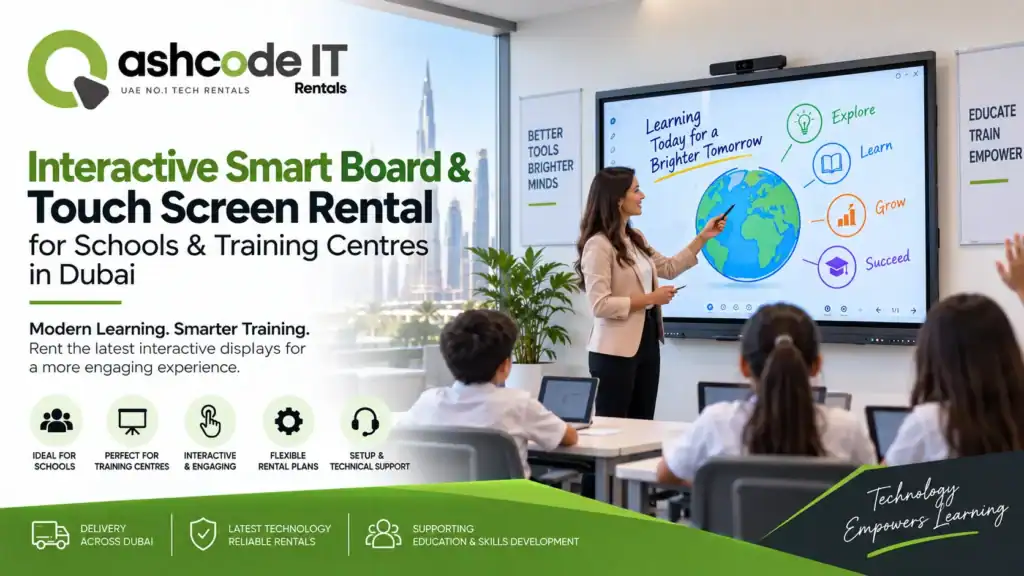
Technology has changed the way students learn and the way trainers deliver information. A traditional whiteboard can still be useful, but modern classrooms increasingly need video, online resources, presentations, diagrams, live demonstrations, and collaborative activities.
That is where Touch Screen Rental for Schools & Training Centres in Dubai can make a practical difference. Instead of purchasing expensive interactive classroom hardware for occasional programmes or temporary requirements, schools and training centres can rent suitable displays for the exact period they need them.
A rented interactive display can turn a standard classroom into a more engaging learning environment without requiring a permanent hardware investment. It can also be useful for workshops, seminars, certification programmes, corporate training, temporary classrooms, educational events, and special training sessions.
In this guide, we will look at how interactive smart boards work, why educational organisations rent them, what features to consider, how to choose the right size, how installation works, and what to check before booking.
1. What Is an Interactive Smart Board?
An interactive smart board is a large digital display that allows users to interact directly with the content on the screen. Instead of simply showing a presentation, the trainer or teacher can write, draw, highlight, move objects, open applications, display videos, and navigate learning materials directly from the panel.
Modern interactive displays may include features such as 4K resolution, multi-touch functionality, built-in whiteboarding, screen sharing, wireless connectivity, annotation tools, and compatibility with computers or mobile devices. Rental providers in Dubai commonly offer multiple display sizes and mounting options to match different room layouts.
For schools and training organisations, this makes an interactive panel more than just a large screen. It becomes a teaching and presentation tool.
2. Why Choose Touch Screen Rental for Schools & Training Centres in Dubai?
Buying an interactive board makes sense when it will be used continuously for years. However, many educational organisations have temporary or changing requirements.
Touch Screen Rental for Schools & Training Centres in Dubai is particularly useful for organisations that:
- Run short-term training programmes
- Conduct workshops and seminars
- Need temporary classrooms
- Organise educational events
- Require additional classrooms during peak periods
- Test interactive teaching technology before purchasing
- Need technology for certification or examination preparation
- Host visiting trainers or guest instructors
Rental also provides greater flexibility when classroom requirements change. A centre can select the display size and accessories required for one programme without committing to a permanent setup.
Another advantage is access to newer equipment without having to manage the complete ownership lifecycle. Depending on the provider, equipment can be delivered, tested, installed, and collected after the programme.
3. How Interactive Touch Screens Improve Classroom Engagement
One of the biggest reasons educational organisations consider Touch Screen Rental for Schools & Training Centres in Dubai is the ability to make lessons more interactive.
Imagine a trainer explaining a complex process using a static PowerPoint slide. With an interactive display, the same trainer can draw directly on the slide, zoom into a diagram, move visual elements, open a live website, play a video, or annotate important information.
Students can also participate.
A teacher may ask students to solve a problem on screen. A technical trainer can demonstrate software step by step. A language instructor can use interactive exercises. A design trainer can review visuals in real time.
This turns the screen from a passive presentation device into a collaborative learning surface.
4. Best Uses for Schools and Training Centres
Touch Screen Rental for Schools & Training Centres in Dubai can support a wide range of educational applications.
School Classrooms
Teachers can combine presentations, videos, diagrams, quizzes, digital textbooks, and interactive exercises in a single lesson.
Professional Training Centres
Training organisations can use touch displays for demonstrations, workshops, certifications, software training, and collaborative exercises.
Corporate Training Programmes
Temporary training rooms can benefit from interactive presentations and real-time annotation without requiring permanent equipment.
Workshops and Seminars
Large touch displays can make presentations easier to follow while allowing trainers to interact directly with the content.
Educational Events
Interactive displays can be used for demonstrations, information points, technology showcases, and hands-on activities.
Temporary Training Rooms
When an organisation adds classrooms for a short programme, renting is a practical way to equip the space quickly.
5. Important Features to Look for in an Interactive Display
When considering an interactive smart board rental Dubai solution, focus on the features that actually match your teaching requirements.
Screen Resolution
A high-resolution display makes text, diagrams, videos, and presentations easier to view. Many rental displays in Dubai are available with 4K UHD resolution.
Multi-Touch
Multi-touch capability allows several users to interact with the display and can support collaborative teaching activities.
Built-In Whiteboarding
Digital whiteboarding allows trainers to write, draw, erase, highlight, and save notes directly on the screen.
Wireless Connectivity
Wireless screen sharing can make it easier for teachers and trainers to present content from laptops, tablets, and compatible mobile devices.
Ports and Compatibility
Check HDMI, USB, network connectivity, and compatibility with the laptops and other devices being used in the classroom.
Built-In Operating System
Some interactive panels offer built-in operating environments, reducing the need for a separate computer for basic presentations and whiteboarding.
Stand or Wall Mount
Mobile stands are useful when the display needs to move between classrooms. Wall mounting can be better for a permanent temporary room layout. Rental providers commonly offer different mounting and stand configurations.
6. Choosing the Right Screen Size
Screen size should be based on classroom dimensions and viewing distance, not simply on the largest model available.
A smaller interactive display may be suitable for a compact training room with a limited number of students. Larger classrooms may benefit from 75-inch, 86-inch, or larger displays.
Several Dubai rental providers advertise a range of sizes from smaller touchscreen displays through large-format interactive boards, allowing organisations to select equipment according to room requirements.
Before selecting a screen, consider:
- Classroom size
- Number of learners
- Seating arrangement
- Viewing distance
- Wall or stand placement
- Required mobility
- Type of content being displayed
If a training room has 20 to 30 learners seated across a wide space, a larger display can make presentations easier to follow than a small monitor placed at the front.
7. Interactive Display Rental vs Projector
Projectors remain useful for large classrooms, but interactive displays can be more convenient for smaller and medium-sized teaching environments.
With a projector, the room may need controlled lighting and sufficient projection space. An interactive panel provides a bright digital surface and allows direct touch interaction.
For trainers who frequently switch between presentations, websites, applications, videos, and whiteboarding, an interactive display can simplify the experience.
That does not mean a touchscreen is always the right solution. A very large classroom or auditorium may still require a projector or LED display. The correct choice depends on the room, audience size, content, and budget.
8. What Equipment Can Be Included?
A professional Touch Screen Rental for Schools & Training Centres in Dubai package may include more than the display itself.
Depending on the project, a rental package can include:
- Interactive touch screen
- Smart board
- Mobile floor stand
- Wall mounting hardware
- Stylus or digital pens
- HDMI and USB cables
- Laptop or computer
- Speakers
- Wireless presentation accessories
- Power and connectivity accessories
Some rental providers also offer related equipment such as laptops, projectors, TVs, and other AV technology. This can be useful when a training centre needs a complete temporary classroom rather than just a display.
9. Setup and Installation: What Should You Expect?
A good rental experience starts before the equipment reaches the classroom.
When booking Touch Screen Rental for Schools & Training Centres in Dubai, share the following details with the provider:
- Number of classrooms
- Number of displays
- Classroom dimensions
- Required screen size
- Rental dates
- Wall-mount or mobile stand requirement
- Laptop and operating system requirements
- Connectivity requirements
- Software or presentation requirements
- Installation and technical support needs
The provider should ideally test the display before delivery. Some Dubai rental companies specifically state that their technical teams test touchscreen equipment before sending it to the customer.
On-site testing should include touch responsiveness, display quality, connectivity, audio, screen sharing, and compatibility with the trainer’s computer.
This is especially important for a training centre where several classes may begin within a short period.
10. Planning for Training Sessions and Workshops
An interactive display rental Dubai solution becomes more valuable when the equipment is integrated into the training plan.
Before the session begins, prepare the presentation, videos, websites, documents, and digital exercises that will be used.
Test every application on the actual rental device.
Check whether the trainer needs to connect through HDMI, USB, Wi-Fi, or a dedicated computer.
Also prepare a backup presentation or local copy of important content. Depending entirely on an internet connection can create problems if the venue experiences connectivity issues.
For large programmes, consider assigning one technical person to handle the equipment. The trainer should be able to focus on teaching instead of troubleshooting cables or display settings.
11. How Much Does Touch Screen Rental Cost in Dubai?
The cost of Touch Screen Rental for Schools & Training Centres in Dubai depends on the equipment configuration and rental duration.
Common pricing factors include:
- Screen size
- Display technology
- Resolution
- Touch capabilities
- Rental period
- Number of units
- Stand or mounting requirements
- Delivery
- Installation
- Technical support
- Additional AV equipment
A single display for a one-day workshop will have a different cost structure from a multi-room training programme running for several weeks.
Instead of comparing providers only on daily rental price, request a quotation that clearly separates equipment, delivery, installation, support, accessories, and collection.
This gives you a more realistic picture of the total project cost.
12. Renting for a Day, Week, Month or Longer
One of the key advantages of Touch Screen Rental for Schools & Training Centres in Dubai is flexibility.
A school may need equipment for a technology workshop lasting two days.
A professional training centre may need several screens for a three-week certification programme.
A company may require interactive displays for a temporary training facility for several months.
The rental duration should match the actual project requirement. Ask the provider about daily, weekly, monthly, and extended rental options before booking.
It is also worth checking whether extensions are possible if the training programme gets extended.
13. What to Check Before Choosing a Rental Company
Selecting a rental provider should involve more than checking the equipment catalogue.
Look at:
Equipment Condition
The display should be clean, tested, and functioning properly.
Availability
Make sure the required screen sizes and quantities are available for your exact dates.
Technical Support
Ask how technical issues are handled during the rental period.
Delivery
Confirm delivery timing and whether equipment is brought directly into the classroom.
Installation
Check whether stand assembly, wall mounting, and testing are included.
Replacement Policy
Understand what happens if a display develops a technical fault.
Compatibility
Confirm compatibility with the laptops, operating systems, applications, and presentation tools used by your trainers.
Rental Terms
Review the agreement for deposit requirements, damage policies, extension charges, delivery fees, and collection terms.
A provider offering digital classroom equipment rental Dubai services should ideally understand both the technology and the practical needs of educational environments.
14. Tips for a Smooth Interactive Classroom Setup
Before the first class begins, run a complete test.
Connect the trainer’s laptop.
Open the presentation.
Test the touchscreen.
Play a video.
Check audio.
Test screen sharing.
Try the whiteboard.
Confirm internet access if online resources are part of the lesson.
Also check the room layout. The display should be positioned where every learner has a clear view without creating unnecessary glare or obstruction.
For mobile displays, lock the stand securely before use.
Finally, keep the provider’s support contact available in the classroom so technical problems can be escalated quickly.
Frequently Asked Questions
Yes. Short-term rental is suitable for workshops, temporary classrooms, special educational programmes, training sessions, and events.
Yes. Multiple units can be arranged for classrooms, breakout rooms, workshops, or multi-location training requirements, subject to availability.
Many rental providers offer mobile or freestanding stand options alongside wall-mounted configurations.
Yes. Interactive displays commonly support connections such as HDMI and USB, while many models also support wireless connectivity. Exact options depend on the equipment model.
Installation and on-site technical assistance may be available depending on the rental package. Confirm the scope of service before booking.
Yes. Renting can provide a practical way to evaluate an interactive classroom setup before committing to a permanent purchase.
Why Choose Ashcode IT Rentals?
At Ashcode IT Rentals, we understand that schools and training centres need technology that works reliably from the first session.
Our Touch Screen Rental for Schools & Training Centres in Dubai solutions can support classrooms, workshops, seminars, corporate training programmes, educational events, and temporary learning environments.
We can help you determine the appropriate screen size, quantity, accessories, and setup based on your room and programme requirements.
Whether you need one interactive board for a short workshop or several displays for a temporary training centre, the goal is to provide a practical setup that is easy for trainers and learners to use.
You can also combine the display rental with laptops, projectors, tablets, speakers, and other IT or AV equipment for a complete temporary classroom solution.
Final Thoughts
Modern training is no longer limited to slides and static notes. Teachers and trainers can use videos, diagrams, live websites, digital whiteboards, software demonstrations, quizzes, and collaborative exercises to create more interactive sessions.
For organisations with temporary or changing requirements, Touch Screen Rental for Schools & Training Centres in Dubai offers a flexible way to access this technology without making a permanent investment.
The key is to choose the right screen size, check compatibility, plan the room layout, test the equipment, and confirm delivery and technical support before the programme begins.
When those details are handled properly, an interactive smart board can become a central part of the classroom rather than simply another piece of AV equipment.
For interactive display requirements in Dubai, contact Ashcode IT Rentals to discuss your classroom or training project.
Website: https://ashcodeitrentals.com/